YOUR EXPERIENCE BELONGS IN THE RECORD
Write it. Paste it. Submit it.
You do not need a technical paper to describe your experience or ask HHS a question. Use your own words. This guide shows you where they go.
Open the official HHS comment form ↗1 · Prepare your words before going online
Draft on paper or in an offline document. If helpful, ask someone you trust to help type or submit with your consent. Keep a copy.
- Your experience: What happened, when, and how did it affect daily life?
- Your observations: What circumstances or changes did you notice? Distinguish what you observed from what you suspect.
- Your evidence or questions: Add any relevant research links, records you choose to share, or questions you want answered.
- Your request: What would you like HHS to investigate or do?
Share only details you want in the public record. Review attachments too, especially information about children or other people.
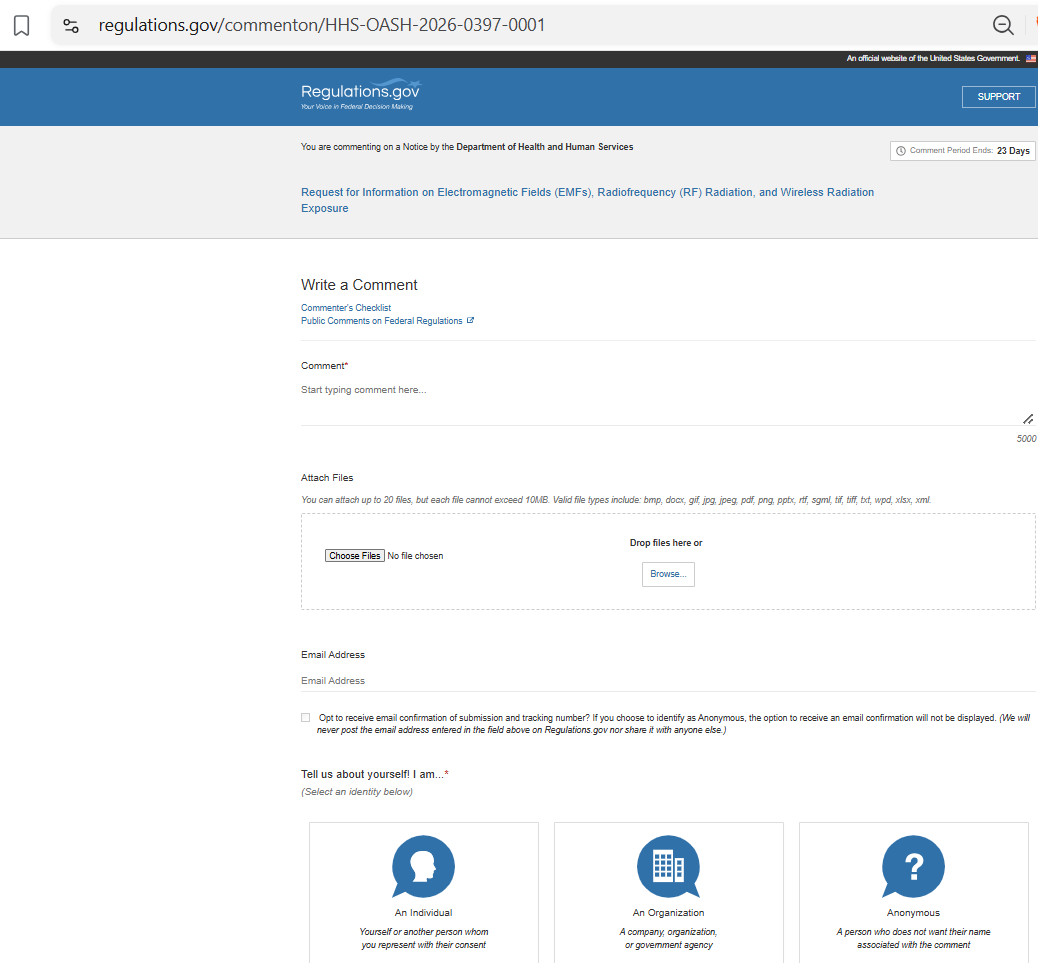
2 · Paste into “Comment”
Open the official form and confirm it is the HHS request about electromagnetic fields, radiofrequency radiation, and wireless radiation exposure. Paste your prepared text into Comment.
For a longer document, use Attach Files and put a short note in the Comment box, such as “Please see my attached comment.” Confirm the attachment appears before continuing. Follow the live form’s current size and file-type limits.
3 · Choose how to identify yourself
Under “Tell us about yourself! I am…”, select An Individual, An Organization, or Anonymous, as appropriate. Complete the required fields shown for your choice.
If you want your name associated with the comment, choose Individual and review the identity fields. Anonymous does not remove names or identifying details you put in your text or attachments.
If the email-confirmation option is available and you want a receipt, enter your email and select it.
4 · Review, submit, and save confirmation
Continue through the official form, review your text, identity choice and attachments, and complete any required checks. Follow the final submit prompt. Save the confirmation or tracking number so you can check your submission later.
A social-media share is not an HHS submission. Your comment must be submitted through the official process to enter that process.
Ready? Open the official form ↗A look at the form
This reference screenshot shows the Comment box, Attach Files, email option, and identity choices. The live form may change.